Editable spreadsheet planner

Travel Itinerary Template for Excel

Use this Travel Itinerary Template Excel planner to organize each day, keep bookings together, and total your trip budget without starting from an empty workbook.

Open in Online Editor
Free .xlsx export Saved locally No sign-up Easy to customize
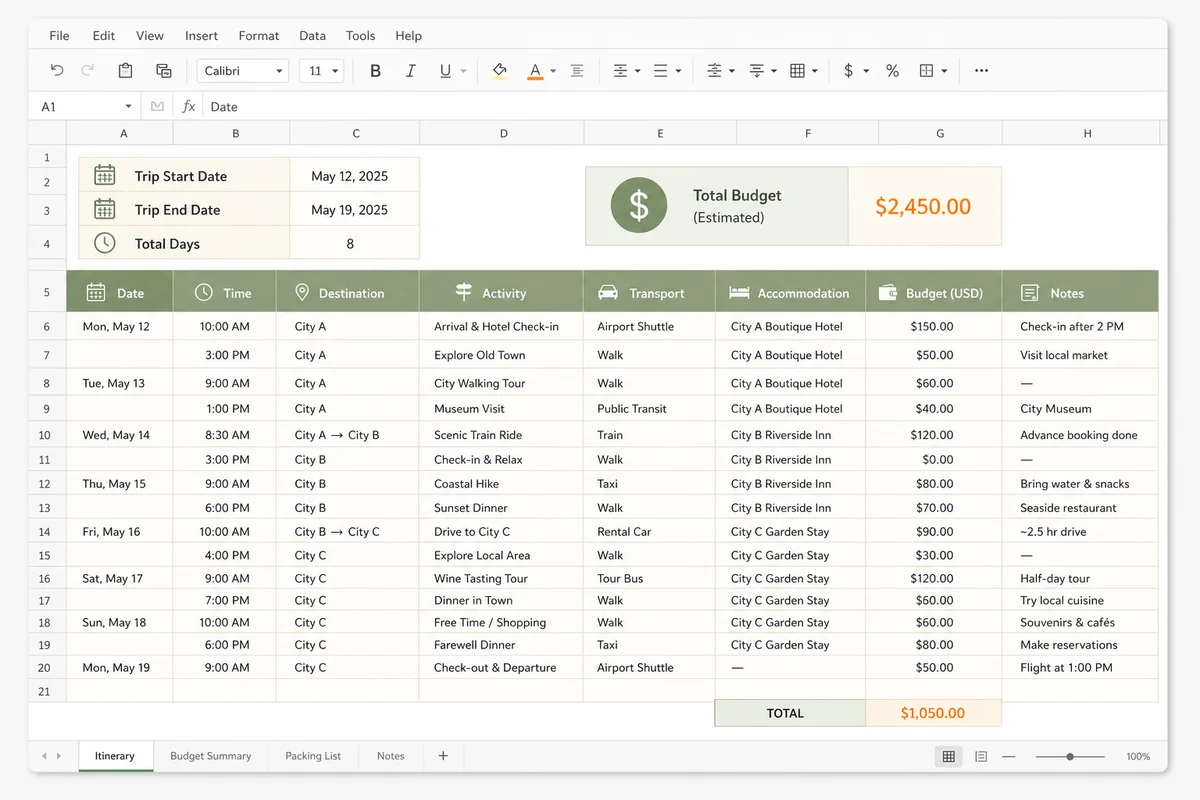
Travel Itinerary Template Excel preview with dates, destinations, activities, transport, accommodation, budget, and notes columns
Preview placeholder — replace with the final product screenshot before launch.

Edit this template online

Edit the Travel Itinerary Template Excel workbook

Changes are saved in this browser automatically. No account or upload is required.

Loading saved plan
PLAN 01
ACTIVITY 01
PLAN 02
ACTIVITY 01
PLAN 03
ACTIVITY 01

OPTIONAL DETAILS

Cover, Accommodation & Notes

Only completed sections appear in the preview.
Cover photoOptional · JPG, PNG or WebP
HOTEL 01

Designed for spreadsheet planning

What does the Travel Itinerary Template Excel workbook include?

Enough structure for real bookings, with the flexibility to sort, filter, extend, and share the plan.

01

Day-by-day spreadsheet

Keep dates, times, places, activities, transport, hotels, costs, and notes in sortable columns.

02

Automatic budget total

Enter an estimated cost for each booking or activity and let the workbook calculate the trip total.

03

Easy sorting and filtering

Reorder rows, filter one destination, or isolate transport and accommodation details when plans change.

04

Useful in Excel and Sheets

Download a genuine .xlsx workbook for Microsoft Excel, then upload it to Google Sheets if your group plans together.

05

Built for real bookings

Dedicated fields keep confirmation notes and practical details beside the part of the trip they belong to.

Four practical steps

How do you use the Travel Itinerary Template Excel workbook?

  1. 1

    Set the trip details

    Add the itinerary title, destination, start and end dates, and the currency you want to use for costs.

  2. 2

    Build the schedule

    Create a row for each activity, transfer, hotel check-in, meal, or reservation. Add or remove rows whenever the plan changes.

  3. 3

    Check the live sheet

    Use the spreadsheet preview to spot missing dates, empty transport fields, and days where the schedule is too crowded.

  4. 4

    Download the workbook

    Export the current plan as an .xlsx file with formatted headers, frozen rows, filters, and an automatic budget formula.

Why choose this Travel Itinerary Template Excel planner?

The Travel Itinerary Template Excel format works well when a trip has more moving parts than a simple day list can hold. A spreadsheet lets you keep the schedule and the practical details in the same row, so a train booking, hotel address, estimated cost, and reminder do not drift into separate notes. Dates remain sortable, budget values stay numeric, and a quick filter can show only the entries for one city or one type of booking.

This travel itinerary template Excel layout is especially useful for detail-oriented travelers, group organizers, executive assistants, and anyone planning a longer multi-stop journey. It gives the trip enough structure to be dependable without forcing every day into a rigid hourly calendar. Add a row when you make a reservation, move it when the timing changes, and leave optional ideas in the notes column until you are ready to commit.

What does the Travel Itinerary Template Excel workbook contain?

The Travel Itinerary Template Excel workbook includes fields for the date, time, destination, activity, transport, accommodation, estimated budget, and notes. The trip title and travel dates sit above the schedule, while the budget total stays visible near the top. That makes the file useful both while planning and during the journey: you can scan the next activity without losing the confirmation note or cost attached to it.

Use the budget column for transport, rooms, tickets, meals, and tours. Because those values are stored as numbers, Excel can total them correctly and you can change the currency format later. Use the notes field for booking references, addresses, opening hours, luggage reminders, or a short backup option. Sensitive passport, payment, or medical information should remain in a secure location rather than a widely shared itinerary.

★★★★★
The columns were already organized the way my brain works. I planned a ten-day trip without losing a single booking number.
M

Maya R.Independent traveler

Excel template questions

Travel itinerary template Excel FAQ

Direct answers about editing, budget formulas, extra destinations, and workbook compatibility.

How do I use the Travel Itinerary Template Excel workbook?

Edit the trip details and schedule in the online Excel itinerary editor, then download the .xlsx file. You can also open the downloaded Travel Itinerary Template Excel workbook in Microsoft Excel and replace the sample rows with your destinations, dates, transport, accommodation, activities, budget, and notes.

Does the Excel template calculate the travel budget?

Yes. Each itinerary row includes a numeric budget field, and the downloaded workbook contains a SUM formula that updates the total when you edit or add costs in Excel.

Can I add more days or destinations?

Yes. Add as many schedule rows as you need and use the destination column for each stop. In Excel you can insert more table rows, copy the formatting, and sort the sheet by date and time.

Can I open this Excel itinerary in Google Sheets?

Yes. Download the .xlsx file, upload it to Google Drive, and open it with Google Sheets. Basic values, formatting, and the budget formula are designed to remain usable.

Is the travel itinerary template Excel download free?

Yes. The editor and workbook download are free, require no account, and may be customized for personal, family, group, or business travel planning.

Your spreadsheet is ready

Start with the sample rows, then make the itinerary yours.

Edit online, save automatically in this browser, and download the finished itinerary whenever the plan is ready to share.

Continue editing online
By Updated