Collaborative document planner

Travel Itinerary Template for Google Docs

Use this travel itinerary template Google Docs planner to shape a readable multi-stop journey, collect helpful comments, and share one polished document with your travel group.

Open in Online Editor
Google Docs-ready .docx Saved locally No sign-up Easy to collaborate
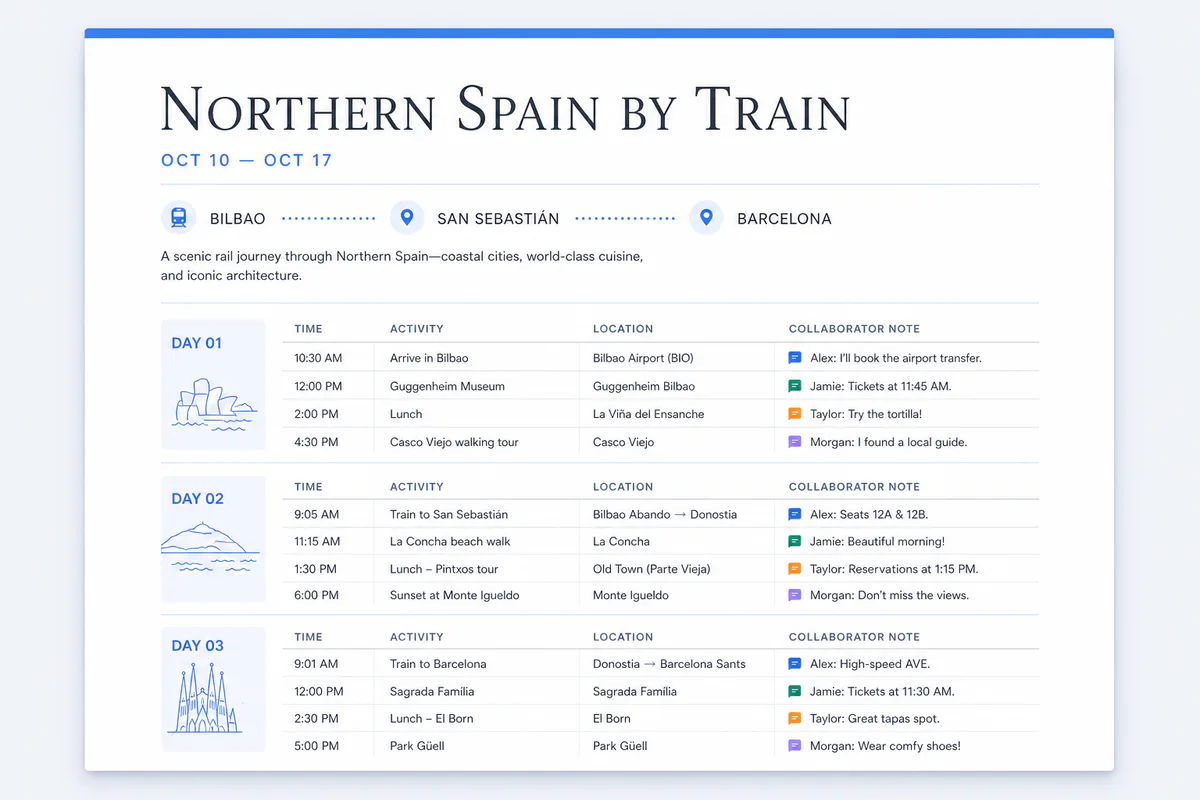
Travel itinerary template Google Docs preview showing a collaborative multi-city document with daily plans, locations, and traveler notes
A collaborative document layout ready to upload, edit, and share in Google Docs.

Edit this template online

Create your google docs itinerary editor

Every change is saved automatically in this browser. Nothing is uploaded and no account is required.

Loading saved plan
PLAN 01
ACTIVITY 01
PLAN 02
ACTIVITY 01
ACTIVITY 02
PLAN 03
ACTIVITY 01
PLAN 04
ACTIVITY 01

OPTIONAL DETAILS

Cover, Accommodation & Notes

Only completed sections appear in the preview.
Cover photoOptional · JPG, PNG or WebP
HOTEL 01

Designed for shared documents

What does the travel itinerary template Google Docs format include?

A readable itinerary with flexible context, collaborative review, and a straightforward path into Google Docs.

01

Document-first layout

Read the journey as a polished document with clear day sections instead of navigating a dense spreadsheet.

02

Google Docs-ready file

Download a formatted .docx file, upload it to Drive, and open it as an editable Google Docs itinerary.

03

Comments and suggestions

Use Google Docs comments, mentions, and suggesting mode after upload to review plans without hiding the current version.

04

Flexible trip details

Include multiple destinations, exact times, activities, accommodation, costs, a cover photo, and practical travel notes.

05

Simple sharing controls

Choose whether companions can view, comment, or edit when you share the document from your own Google Drive.

From browser to Google Drive

How do you use the travel itinerary template in Google Docs?

  1. 1

    Build the journey

    Set the title, dates, travelers, currency, and destinations, then group each day’s activities in chronological order.

  2. 2

    Add optional context

    Include accommodation, a cover photo, costs, booking details, and notes only where they make the itinerary more useful.

  3. 3

    Download the document

    Export the completed travel itinerary as a formatted .docx file from the editor below.

  4. 4

    Open it in Google Docs

    Upload the file to Google Drive, choose Open with Google Docs, then share it with the people joining the trip.

Why use a travel itinerary template Google Docs document?

A travel itinerary template Google Docs document is a good fit when the plan needs both structure and room for explanation. A spreadsheet is excellent for filtering rows, but a document is easier to read from beginning to end and gives you more space for arrival instructions, restaurant context, accessibility reminders, or a short note about why a stop matters. This template keeps dates and activities consistent while still feeling like a travel brief rather than a database.

The format is especially useful for couples, families, tour leaders, retreat organizers, and friend groups who want to review a shared plan. After you download the file and open it in Google Docs, collaborators can suggest an edit, comment beside a specific activity, or mention the person responsible for a booking. Version history helps recover an earlier plan if someone removes useful information. Sharing happens through your own Google Drive, so this website never needs access to your Google account or itinerary.

What does the travel itinerary template Google Docs file include?

The travel itinerary template Google Docs file includes the trip title, travel dates, travelers, destination route, exact activity times, locations, booking notes, optional costs, accommodation details, a cover photo, and travel notes. Multiple activities on the same date stay together in one day section, while multi-destination plans identify the relevant city for every day. Optional fields disappear from the preview when they are empty, keeping a simple journey genuinely simple.

Start with fixed transport, hotel check-ins, ticketed attractions, and reservations. Add flexible ideas around those commitments, then use comments for questions that have not been resolved. Once the group agrees, accept or reject suggestions and download a stable PDF or printout from Google Docs for offline use. Avoid putting passport scans, payment card details, door codes, or sensitive medical information in any travel itinerary template Google Docs file that has broad link access.

★★★★★
Comments kept every decision beside the right day, so our group could refine the route without losing the clean itinerary we wanted to take with us.
M

Morgan T.Friends’ trip organizer

Google Docs template questions

Travel itinerary template Google Docs FAQ

Direct answers about upload, collaboration, multiple destinations, PDF copies, privacy, and free access.

How do I use the travel itinerary template in Google Docs?

Complete the online editor, download the Google Docs-ready .docx file, upload it to Google Drive, and choose Open with Google Docs. You can then edit, comment, share, print, or save it as a native Google Doc.

Can several people edit the Google Docs itinerary together?

Yes. Share the uploaded document from Google Drive and assign viewer, commenter, or editor access. Comments and suggesting mode are useful when the group wants to review changes before accepting them.

Does the Google Docs travel itinerary support multiple destinations?

Yes. Each plan day has its own destination, so one itinerary can cover several cities or stops without creating separate documents.

Can I download the Google Docs itinerary as a PDF?

Yes. After opening the file in Google Docs, use File, Download, PDF Document. You can also download a PDF directly from this page’s editor if you need a quick offline copy.

Is the travel itinerary template Google Docs download free?

Yes. The editor and Google Docs-ready .docx download are free, require no sign-up, and save unfinished changes only in your current browser.

Ready to write together

Turn the working schedule into one document everyone can follow.

Build the itinerary here, keep it saved in this browser, and download a polished document to open and share through your own Google Drive.

Continue editing online
By Updated